M3U8 is the UTF-8 text playlist used by HLS (HTTP Live Streaming). The file itself contains no video frames — it’s a manifest listing segment URLs (.ts or .m4s), their durations, and the available bitrate variants. A player reads the .m3u8, fetches segments in order, and stitches them together in real time. This is the mechanism underneath YouTube, Netflix, Twitch, Apple TV+, and most major streaming services in 2026.
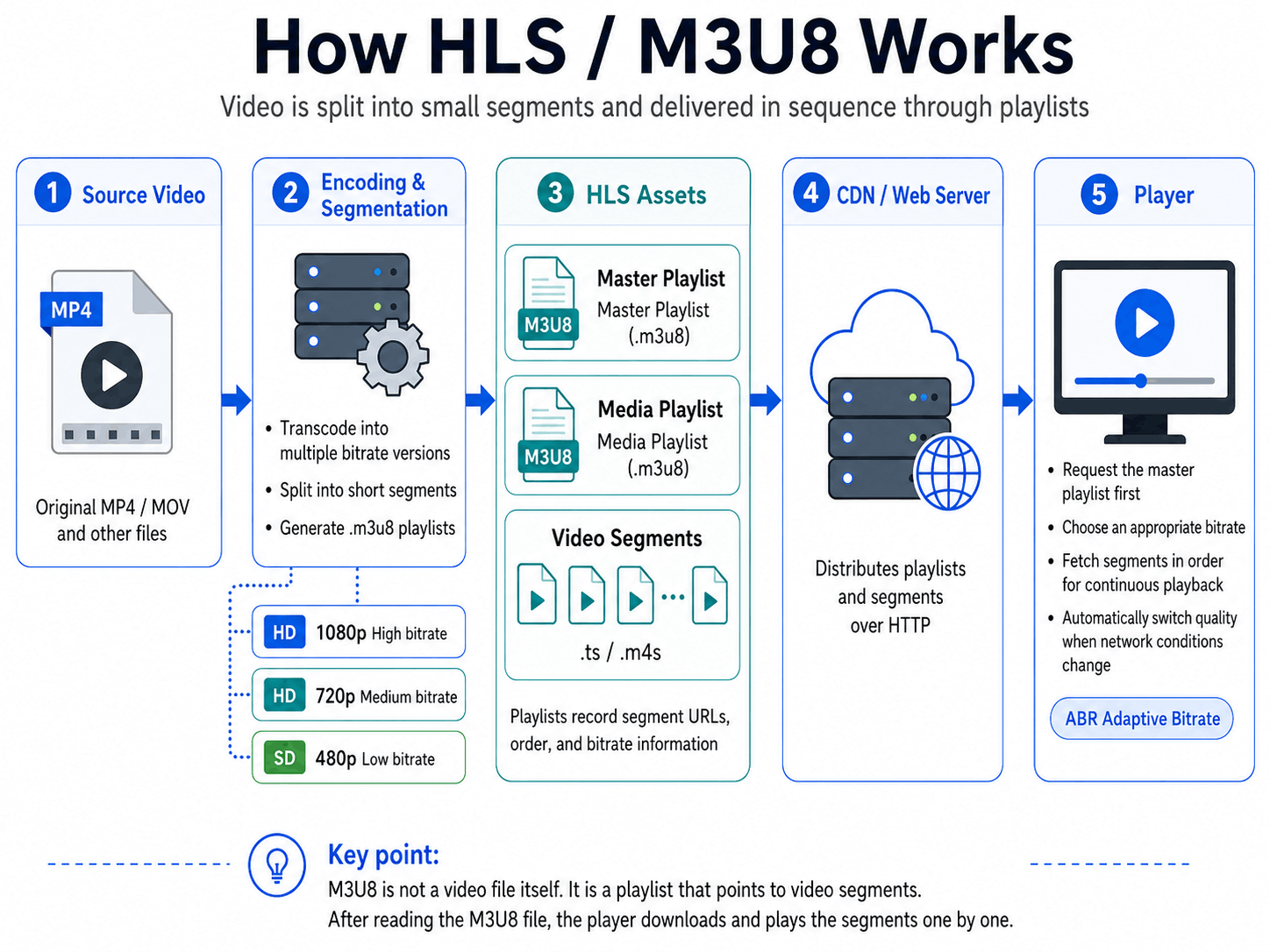
Have you ever tried to save a video from a streaming site and ended up with hundreds of tiny .ts files instead of one tidy .mp4? Or opened a Network tab in your browser, expecting a clean download URL, and instead found a never-ending stream of two-second chunks pouring in? You weren’t doing anything wrong. You were watching HLS — the protocol that delivers most of the streaming video on the modern web — and HLS doesn’t ship videos as single files. It ships them as recipes plus parts.
The recipe is a small text file called an .m3u8 playlist. The parts are short, independently decodable video segments your player stitches together on the fly. HLS was created by Apple in 2009 for the original iPhone and standardized as RFC 8216, and today nearly every major browser, mobile device, and TV supports it natively.
This guide walks through what an .m3u8 actually contains, why streaming services chose this design, how .ts and fMP4 segments fit together, which platforms use HLS in 2026, and what happens when you try to save one of these streams to disk.
Key Takeaways
- HLS is a streaming protocol, not a file format. It delivers video as a playlist (
.m3u8) plus short segments (.tsor fragmented MP4) over plain HTTP. .m3u8is the index, not the video. Saving the.m3u8file alone gives you a recipe with no ingredients.- Apple created HLS in 2009 for the iPhone and standardized it as RFC 8216 in 2017. It’s now mandatory on iOS/Safari and supported almost universally elsewhere.
- Segments are 2–10 seconds of video each — short enough to switch quality between them, long enough to keep HTTP overhead reasonable.
- A master playlist lists variants; a media playlist lists segments. Players read the master, pick a variant, then load that variant’s media playlist.
.tssegments are being replaced by fragmented MP4 (CMAF), so the same file can serve HLS and DASH players from one origin.- Most modern streaming sits on HLS or DASH, often both at once — including YouTube, Netflix, Disney+, Twitch, Apple TV+, and Cloudflare Stream.
M3U8 vs MP4: The Key Differences
Most people meet .m3u8 for the first time when they try to save a video and get a tiny text file instead of the expected .mp4. The two formats often appear in the same workflow but are not the same kind of thing at all — one is a playlist (manifest), the other is a container. Here are the differences people actually search for.
| Dimension | M3U8 (HLS playlist) | MP4 (video container) |
|---|---|---|
| What it is | UTF-8 text playlist (manifest) | Self-contained binary video container |
| Storage layout | One .m3u8 + dozens to hundreds of .ts/.m4s segments | A single .mp4 file |
| File size | Manifest is a few KB; segments together ≈ same-quality MP4 | Whole video in one file |
| Quality switching | Adaptive bitrate (multiple variants, live switch) | Single fixed quality |
| Live streaming | Native (manifest can grow with new segments) | Not suitable for live |
| Seek | Instant at segment boundaries | Needs HTTP Range support on the server |
| Encryption | AES-128 segment encryption + FairPlay/Widevine DRM layers | Unencrypted by default; DRM optional via container |
| Player support | Needs an HLS-capable player (Safari, VLC, IINA, hls.js) | Almost every player plays MP4 natively |
| Typical use | Netflix, YouTube, Twitch, Apple TV+ online delivery | Local playback, downloads, editing, email attachments |
| For offline use | Segments must be merged in playlist order into one MP4 | Already a portable, shareable file |
One-line summary: M3U8 is the table of contents; MP4 is the finished file. When you watch online, the browser grabs an M3U8 manifest and pulls segments on demand. When you want to keep a copy or share it, you almost always end up merging those segments back into an MP4.
The Simple Explanation
Forget protocols for a second. Imagine a director who needs to ship a finished movie to viewers all over the world over unreliable internet. Sending one giant MP4 is a non-starter: if a viewer’s connection drops mid-download, they’re back to zero, and there’s no way to switch quality without re-downloading. So instead, the director cuts the movie into hundreds of 6-second clips and writes a numbered playlist that says “play clip 001, then 002, then 003…” The viewer’s player downloads the playlist, fetches the first few clips, and starts playing while the rest stream in behind it. If the connection slows, the player switches to a lower-quality version of the next clip without missing a frame.
That’s HLS in a sentence: a movie cut into short clips, plus an .m3u8 playlist file that tells the player which clip to play next.
From a viewer’s seat, this design hides a lot of magic. Seeking is instant because the player can jump to whichever segment covers the target timestamp instead of streaming through the whole file. Quality changes are smooth because the player can pick a different variant for the next segment without restarting playback. Buffering is gentle because the player only needs to keep a few segments ahead — usually 10 to 30 seconds — instead of pre-downloading huge chunks of file. And live streaming works at all because new segments can be appended to the playlist as the broadcaster produces them, with the player polling the .m3u8 for new entries every few seconds.
If you’ve ever wondered why a YouTube or Netflix stream picks itself up smoothly when your Wi-Fi wobbles, while a direct MP4 download from a random website stalls and dies, this is why. The whole stack was designed around the assumption that the internet is messy and connections come and go. A long discussion of how players adapt quality on the fly lives in its own article; here, just notice that the segment-and-playlist design is what makes that adaptation possible at all.
How HLS Actually Works
An HLS stream is two layers of playlist plus a pile of segments, all served over ordinary HTTP. Nothing exotic, no custom protocol — your browser already knows how to do every part of this.
The Master Playlist
The first thing a player fetches is the master playlist. It’s a small text file with a .m3u8 extension that lists every available variant of the stream — usually different quality levels — along with the bandwidth and resolution of each. Here’s what a real one looks like, lightly trimmed:
#EXTM3U
#EXT-X-VERSION:6
#EXT-X-STREAM-INF:BANDWIDTH=5000000,RESOLUTION=1920x1080,CODECS="avc1.640028,mp4a.40.2"
1080p/index.m3u8
#EXT-X-STREAM-INF:BANDWIDTH=2800000,RESOLUTION=1280x720,CODECS="avc1.4d401f,mp4a.40.2"
720p/index.m3u8
#EXT-X-STREAM-INF:BANDWIDTH=1400000,RESOLUTION=854x480,CODECS="avc1.4d401e,mp4a.40.2"
480p/index.m3u8
The #EXTM3U line marks the file as an extended M3U playlist. #EXT-X-VERSION:6 declares which HLS protocol version is in use. Each #EXT-X-STREAM-INF block describes one variant: its bitrate, resolution, and codec string, followed by a URL pointing to a second playlist for that variant. The player reads this file, estimates your bandwidth, and picks the variant it thinks you can sustain.
The Media Playlist
Once the player picks a variant, it fetches that variant’s media playlist. This is where the actual segment URLs live:
#EXTM3U
#EXT-X-VERSION:6
#EXT-X-TARGETDURATION:6
#EXT-X-MEDIA-SEQUENCE:0
#EXTINF:6.000,
segment000.ts
#EXTINF:6.000,
segment001.ts
#EXTINF:6.000,
segment002.ts
#EXT-X-ENDLIST
#EXT-X-TARGETDURATION:6 says no segment is longer than 6 seconds. Each #EXTINF:6.000, line announces a segment’s exact duration, followed by the segment URL. #EXT-X-ENDLIST tells the player this is a video-on-demand stream — no more segments will ever be added. Live streams omit #EXT-X-ENDLIST, and the player re-requests this playlist every few seconds to discover new segments.
Segments: .ts and fMP4
Segments are short chunks of video and audio — usually 2 to 10 seconds — cut on keyframe boundaries so the player can start decoding from the beginning of any segment. When the playlist declares #EXT-X-INDEPENDENT-SEGMENTS, every segment is guaranteed to be playable on its own; without that flag, downstream segments may depend on data carried in earlier ones. Historically segments are MPEG-2 Transport Stream files with a .ts extension — the same container format that ships satellite and cable TV. MPEG-TS was designed for noisy broadcast channels, so it’s robust against partial corruption, and any player that can decode .ts packets can play an HLS segment.
The typical segment length is 2 to 10 seconds. Shorter segments mean lower latency and more agile bitrate switching, but more HTTP requests and more overhead per minute of video. Longer segments mean better compression efficiency and fewer requests, but slower reaction to bandwidth changes. Apple’s original spec recommended 10-second segments; modern services usually settle in the 2–6-second range.
Since 2016, the industry has been migrating from .ts to fragmented MP4 segments — specifically the Common Media Application Format (CMAF), standardized as ISO/IEC 23000-19. CMAF segments use the same MP4 fragmentation as MPEG-DASH, which means a single set of files on a CDN can serve both HLS and DASH players. This is a significant cost win for streaming services: one encode, one set of bytes, two protocols. Modern HLS streams from YouTube, Netflix, and Apple are nearly all CMAF rather than legacy MPEG-TS.
HTTP All the Way Down
The “HTTP” in HTTP Live Streaming is the punchline. There is no special protocol on the wire — every part of HLS travels over the same HTTPS requests your browser uses for HTML and JPEGs. CDNs love this because they were already optimized for HTTP. Firewalls allow it because nothing looks unusual. CDNs can cache popular segments at the edge. Range requests, gzip, HTTP/2, HTTP/3, TLS — all of it works for free.
This is also why HLS won. Earlier streaming protocols like RTMP, RTSP, and MMS needed dedicated ports, stateful servers, and special firewall rules. HLS just looks like a website serving a lot of small files.
Most users don’t need to handle this manually — VidMost parses the .m3u8 manifest and merges the segments into a clean MP4 in the background.
Where You Encounter HLS in the Real World
HLS is on virtually every major streaming service in 2026, often alongside DASH. Apple invented HLS in 2009 specifically to deliver video to the original iPhone — the device couldn’t handle progressive download well over cellular networks, and Apple wanted a streaming format that just looked like HTTP traffic to carriers. The protocol has since become the default for an enormous slice of the internet.
- Apple’s own services are HLS-only. Apple TV+, the iTunes Store, podcasts on Apple Podcasts, and every video that plays on Safari, iOS, or tvOS sits on HLS. Apple platforms don’t ship a built-in MPEG-DASH decoder, so any service that wants to play on iPhone must offer an HLS feed.
- YouTube uses MPEG-DASH as its primary protocol on the web and Android, but ships HLS for iOS, Safari, AirPlay, and most TV apps. Open the browser developer tools on YouTube in Safari and you’ll see
.m3u8requests; in Chrome on Android you’ll see DASH.mpdrequests instead. - Netflix, Disney+, Hulu, Max, and Amazon Prime Video all use a mix. Their smart TV and console apps frequently use HLS with FairPlay or PlayReady DRM; their web players often switch to DASH with Widevine. Same content, different protocol per client.
- Twitch has run on HLS since 2014 when it dropped the legacy RTMP stack on the playback side. Every live stream and every VOD on Twitch is HLS under the hood.
- Live cam and creator platforms — Bigo Live, Chaturbate, OnlyFans live, Fansly streams — almost universally use HLS for browser playback because it works with no plugins and tolerates flaky connections.
- Hosted video providers like Vimeo, Mux, JW Player, and Cloudflare Stream deliver HLS by default. If a website embeds a Vimeo or Mux iframe, the video underneath is almost certainly HLS.
- Sports and news broadcasters — ESPN, the BBC iPlayer, DAZN, Sling TV — all rely on HLS for live event delivery, often with DRM layered on top.
HLS escaped its iOS origins because it solved real problems for everyone, not just Apple. By the time DASH arrived in 2012, HLS already had broad CDN support, working players in the wild, and momentum. Today the two protocols co-exist; a thoughtful streaming service supports both, and many ship the same CMAF segments under both manifest formats. For more on how DASH compares to HLS in detail, the sibling article covers it end to end.
What This Means If You Want to Save the Video
Knowing how HLS works makes one practical problem suddenly obvious: you can’t just “right-click → Save As” your way to a downloaded HLS video. A few of the reasons are mechanical, a few are subtle, and one or two will surprise you.
- The browser’s Save As only saves the
.m3u8. The.m3u8is what the page actually downloads when it starts playback — a small text file. Saving it gets you the recipe, not the food. Opening that file in VLC sometimes works (VLC will follow the URLs inside), but only while the original session is still valid and the URLs haven’t expired. - Each segment is a separate HTTP request. A 30-minute video at 6-second segments is 300 separate downloads. You’d need to enumerate the playlist, fetch every segment, and concatenate them in the correct order before they’re playable as a single file.
- Variant selection is a real choice. Master playlists list multiple qualities. Picking the wrong one gives you a 480p copy of a movie that was streaming at 1080p. The right call is usually the highest-bandwidth variant your storage and patience can absorb.
- HTTPS protects the bytes in transit, not the bytes on disk. Segment URLs are almost always served over HTTPS, so an eavesdropper on the network can’t read what you’re streaming. But once a segment arrives at your browser it’s plaintext video — TLS does nothing to stop a tool that already has access to the response.
- HLS supports AES-128 segment encryption as a content layer. When the
.m3u8carries an#EXT-X-KEYtag, each segment is encrypted with AES-128 and the playlist points at a key URL the player fetches over HTTPS. Save the segments without the key and you have a folder of ciphertext. This is content encryption, separate from transport security, and it has no entitlement check baked in — the key URL itself is the gate. - Commercial DRM is a different problem. Premium services like Netflix, Disney+, and Apple TV+ layer HLS with FairPlay (Apple), Widevine (Google), or PlayReady (Microsoft). The on-the-wire encryption is still AES-based, but the keys are issued by a license server only after the player proves entitlement on a trusted device, and decryption happens inside a hardware-backed secure module so frames never touch application memory. See What Is DRM-Protected Content? for the full picture.
- Tokens and signed URLs expire. Many
.m3u8URLs and segment URLs are signed with short-lived tokens that go stale in minutes. By the time you’ve manually scripted the download, half your links may already be dead.
This is where VidMost is built to take over. VidMost is designed for legitimate backup of HLS content you have the right to access — your own livestream archives, paid lectures you bought, freely licensed or public-domain video, corporate training material that isn’t behind commercial DRM, and paid subscription content the service’s terms permit you to download. It parses the .m3u8 manifest, picks the highest-quality variant available, downloads every segment in parallel from the same CDN your browser was already talking to, handles the ordinary AES-128 segment encryption automatically, and remuxes the segments into a single clean MP4 file. Streams locked behind commercial DRM — FairPlay, Widevine, or PlayReady on premium services like Netflix, Disney+, or Apple TV+ — are out of scope; please follow each platform’s terms of service and the law where you live. For everything else, the user-visible experience is “paste a compliant URL, get an MP4” — the protocol layer disappears.
Common Pitfalls and Misconceptions
A handful of misconceptions about HLS show up in forum threads over and over. Worth clearing up.
- “.m3u8 is not the video file.” It’s the index. The actual video is in the segments the playlist references. If a tool offers to “download the m3u8,” ask whether it also fetches and merges the segments — otherwise you have a useless text file.
- “.ts files won’t play directly in most players.” A single segment might play a few seconds in VLC, but the whole video isn’t a sequence of
.tsfiles in a folder — it’s a sequence where each must be decoded in order and stitched together. Players that don’t speak HLS will at best play the first segment and stop. - “HLS doesn’t always mean live.” “HTTP Live Streaming” is a misleading name in 2026. HLS works equally well for video-on-demand: same playlists, same segments, just with
#EXT-X-ENDLISTmarking a finite stream. The vast majority of Netflix, Disney+, and Apple TV+ catalog content is VOD HLS, not live. - “Higher bitrate isn’t always better quality if your connection drops.” A 10 Mbps variant looks great on fiber and stutters miserably on a 3 Mbps mobile link. The whole point of the adaptive design is that the player chooses what your connection can sustain — overriding it manually often makes the experience worse, not better.
- “Browser download tools usually fail on HLS.” Generic “video downloader” extensions look for
<video src="...">tags pointing at MP4 files. HLS streams don’t expose a URL like that; the player uses Media Source Extensions to feed segments into the video element programmatically. This is exactly why dedicated tools that parse the manifest exist.
Closing Thoughts
HLS is the silent infrastructure under most of the video you watch. It works because it gave up trying to be clever about transport — there’s no custom protocol, no special server, just .m3u8 text files and .ts or fMP4 segments fetched over the same HTTP your browser already speaks. Apple solved a phone problem in 2009 and accidentally built the dominant streaming format of the next two decades.
Once you can recognize an .m3u8 request in your browser’s network tab and read a playlist, a huge amount of streaming behavior — the brief quality switches, the instant seeking, the “buffer ahead” indicator, the strange folder of .ts files you ended up with — stops being mysterious. It’s all the same loop: fetch playlist, pick variant, fetch segments, decode, repeat.
If you’d rather skip the protocol layer entirely and just save the video, VidMost handles HLS, DASH, fMP4, and DRM-protected streams.
Related reading
- How Online Video Actually Plays — the full pipeline from camera to your screen.
- MPEG-DASH vs HLS — when each protocol wins and why most streaming services ship both.
- Why Video Quality Changes Mid-Playback — the ABR logic inside every HLS and DASH player.
- Video Containers vs Codecs — what’s really inside an
.mp4,.ts, or.m4s. - What Is DRM-Protected Content? — how Widevine, FairPlay, and PlayReady gate the encrypted variants you can’t just save.