DRM-protected content is digital media — video, audio, ebooks, or software — that has been encrypted so it can only be played on devices that authenticate with a license server and receive a valid decryption key. The technology has been central to commercial streaming since the late 1990s and powers virtually every paid streaming service in 2026, including Netflix, Disney+, Spotify, Apple TV+, and the Amazon Kindle ecosystem. Three pieces make it work: content encryption at packaging time, a license server that hands out keys at playback time, and a secure decryption module on your device.
This guide explains how DRM works step by step, the three industry-standard systems (Widevine, FairPlay, PlayReady) you actually encounter every day, what Widevine security levels mean for your video quality, and the legal trade-offs you accept whenever you sign up for a streaming service.
Key Takeaways
- DRM = encryption + license server + secure decryption. Three pieces, all required.
- Three systems dominate consumer streaming: Widevine (Google, used by Chrome/Firefox/Edge/Android), FairPlay (Apple, used by Safari/iOS), PlayReady (Microsoft, used by Edge on Windows/Xbox).
- Widevine L1 unlocks 4K, Widevine L3 caps at 480p–720p. The level is determined by hardware support, not your subscription.
- DRM is contract enforcement, not anti-piracy. Studios require it; streaming services implement it to license content at all.
- Encrypted Media Extensions (EME) is the W3C-standard browser API that bridges web pages to DRM modules — W3C EME spec.
- Circumventing DRM is regulated under DMCA §1201 in the US and equivalents elsewhere (17 U.S.C. §1201).
- Downloads expire. Even files you “saved offline” stop working when the license server stops issuing keys.
What Is DRM-Protected Content?
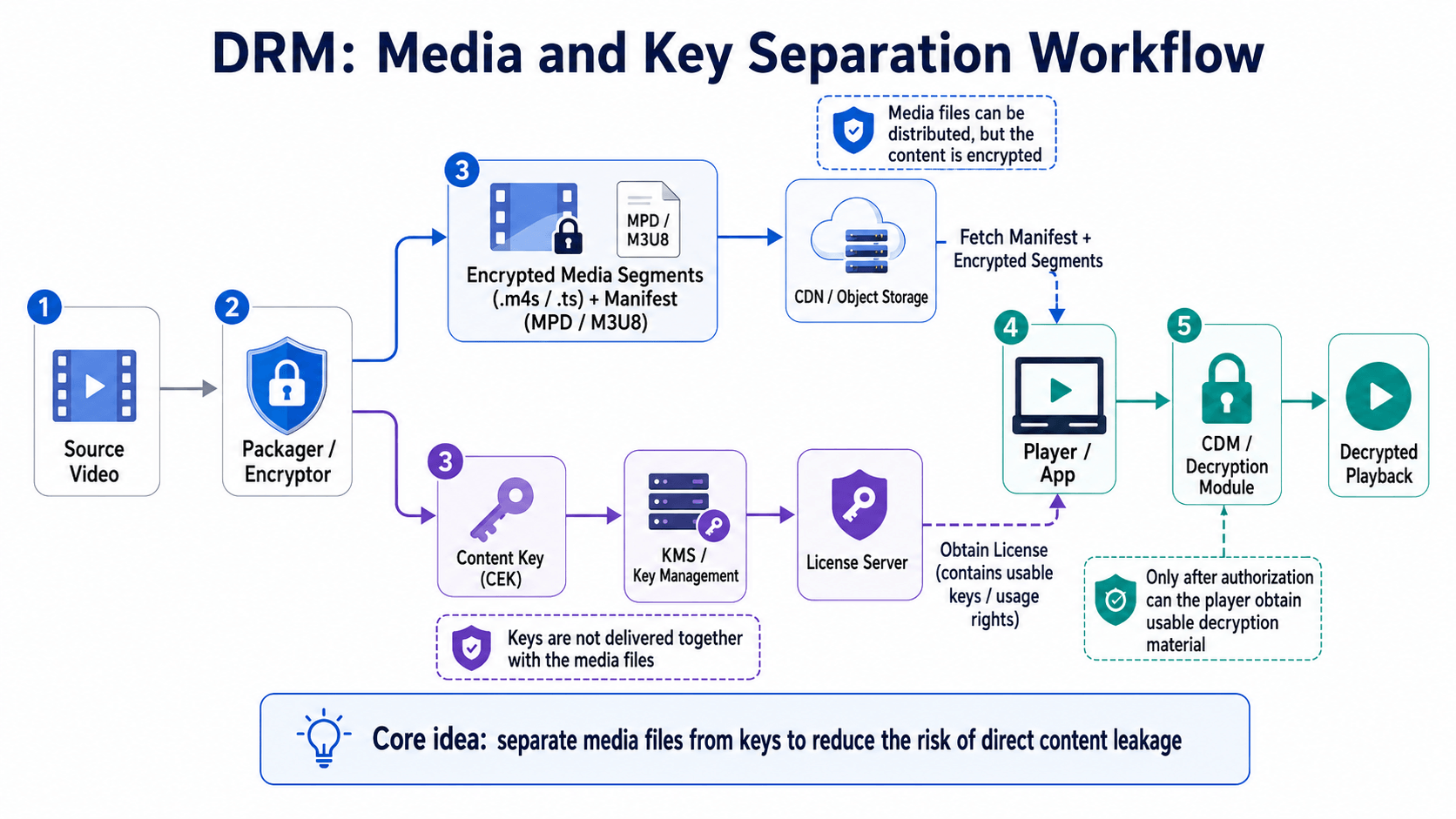
DRM-protected content is any digital file — video, audio, ebook, game, or software — that has been encrypted so only authorized devices can decrypt and play it. DRM stands for Digital Rights Management. The protection is mathematical, not just policy: the file’s raw bytes are unreadable without a key, and the key is held by a remote license server controlled by the rights holder.
You encounter DRM-protected content every time you watch Netflix, rent a movie on Apple TV+, listen to Spotify, or open a Kindle book. The protection is silent on a device the service trusts and obvious on one it doesn’t: Linux laptops, older smart TVs, and browsers without a supported Content Decryption Module either play at reduced quality or refuse to play at all. Even free, ad-supported tiers from major streaming services (Tubi, YouTube paid rentals, the free tier on most ad-supported platforms launched 2022–2024) sit behind DRM whenever the underlying content is licensed from a studio.
Common DRM-protected formats in 2026 include MPEG-DASH and HLS streams encrypted with MPEG Common Encryption (CENC, first published as ISO/IEC 23001-7 in 2012 and now in its third edition), Apple HLS streams encrypted with FairPlay, and audiobook and ebook formats with vendor-specific DRM layers.
How Does DRM Work? The Three-Step Encrypt → License → Decrypt Flow
Every major DRM system follows the same three-step flow: content is encrypted before distribution, your device requests a license when you press play, and a secure module decrypts the stream just in time for the GPU to display it.
Step 1: Encryption at Packaging Time
Before the content ever reaches a CDN, the original video or audio file is encrypted — typically with AES-128 in CTR mode — using a content key. The encrypted bytes are useless on their own; the matching key is never shipped with the file. MPEG Common Encryption (CENC) is the standard that makes the same encrypted file compatible with multiple DRM systems.
Step 2: License Request at Playback Time
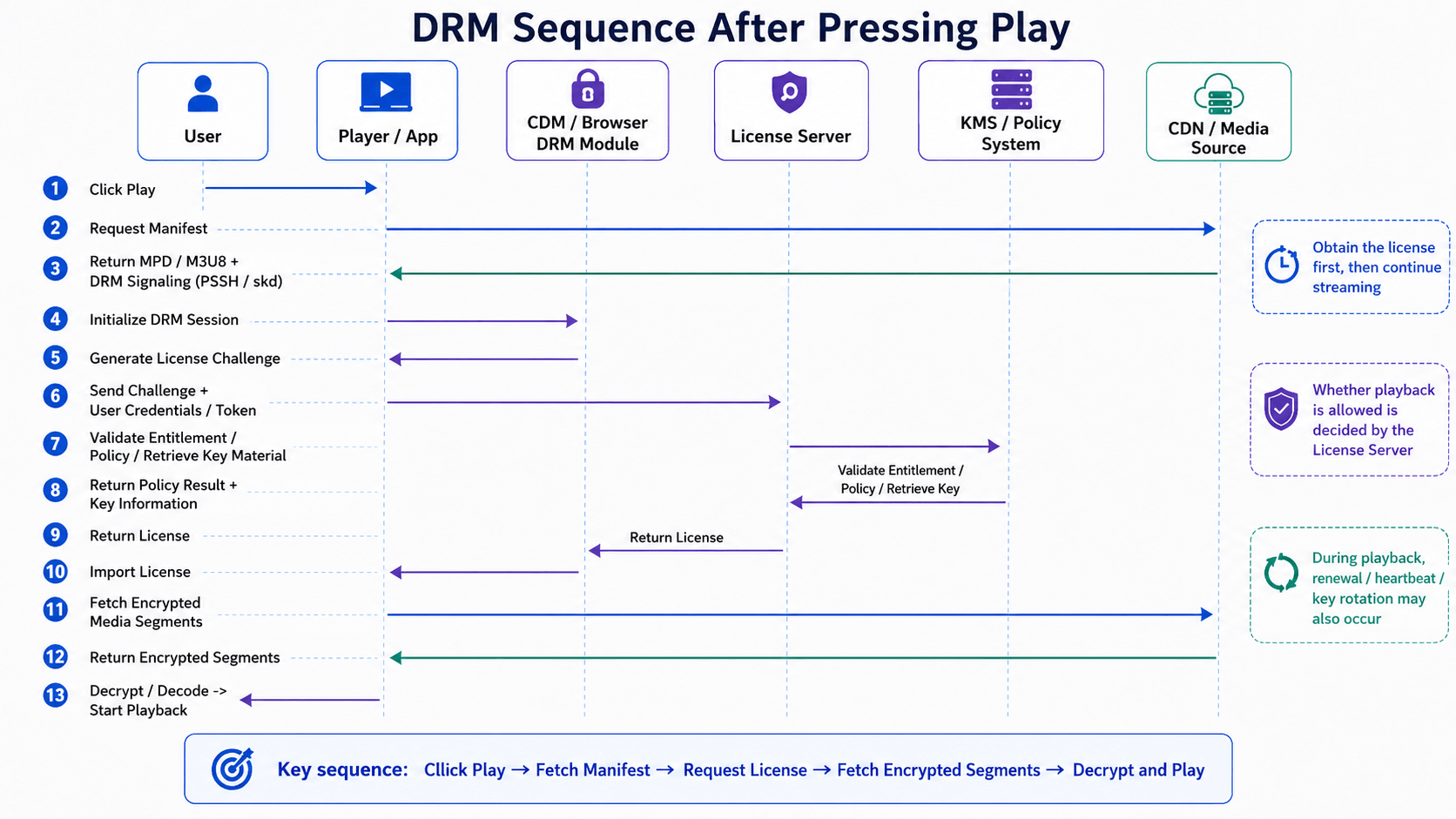
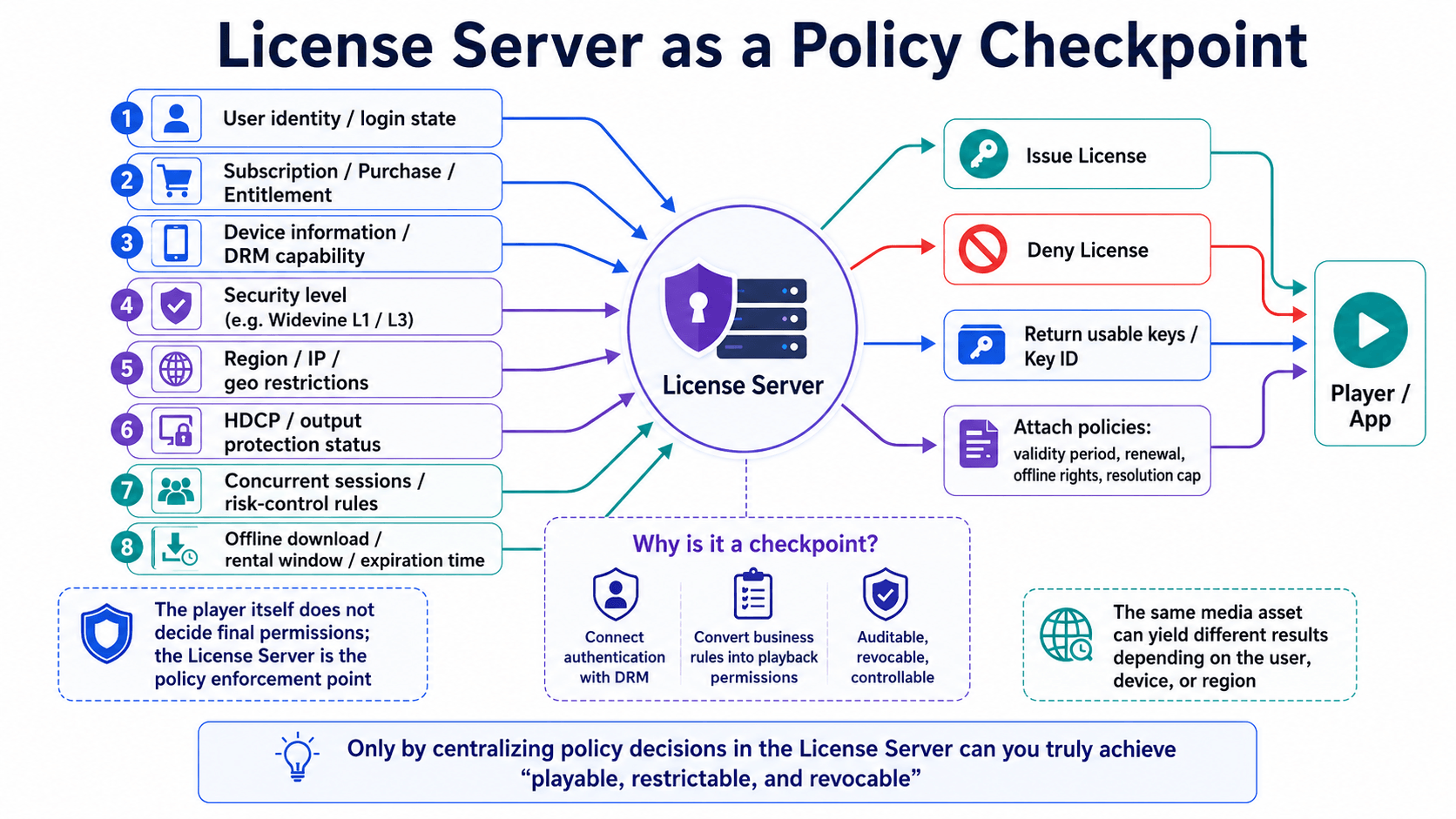
When you press play, the DRM client on your device — built into your browser, your phone’s OS, or the streaming app — sends a license request to the service’s license server. The request includes proof of identity (subscription, device trust, region) and asks for the key needed to play this specific stream right now.
Step 3: Decryption Inside a Secure Module
If the license server approves, it returns the content key wrapped so that only a trusted execution environment (TEE) on your device can unwrap it. The decrypted video frames pass directly from the TEE to the GPU for display — they never sit in regular application memory where a screen recorder could grab them.
This entire dance happens in well under a second every time you start playback, and again every few minutes as licenses renew.
Widevine vs FairPlay vs PlayReady: Which DRM Does What?
The three DRM systems used by virtually every consumer streaming service in 2026 are Widevine (Google), FairPlay (Apple), and PlayReady (Microsoft). Which one plays your stream depends on the operating system and browser you’re on — not on the service or the content itself. All three predate modern streaming: PlayReady launched in 2007, Widevine was acquired by Google in 2010, and FairPlay has shipped in Apple platforms since iTunes added music DRM in 2003 (the streaming variant, FairPlay Streaming, arrived in 2015).
| DRM System | Owner | Primary Devices | Used By |
|---|---|---|---|
| Widevine | Android, ChromeOS, Chrome / Edge / Firefox on desktop | Netflix, YouTube, Disney+, Prime Video, HBO Max | |
| FairPlay Streaming | Apple | iPhone, iPad, Mac, Apple TV, Safari | Apple TV+, iTunes Store, Safari-based streaming |
| PlayReady | Microsoft | Windows, Xbox, smart TVs, set-top boxes | Netflix on Windows/Xbox, BBC iPlayer, many European broadcasters |
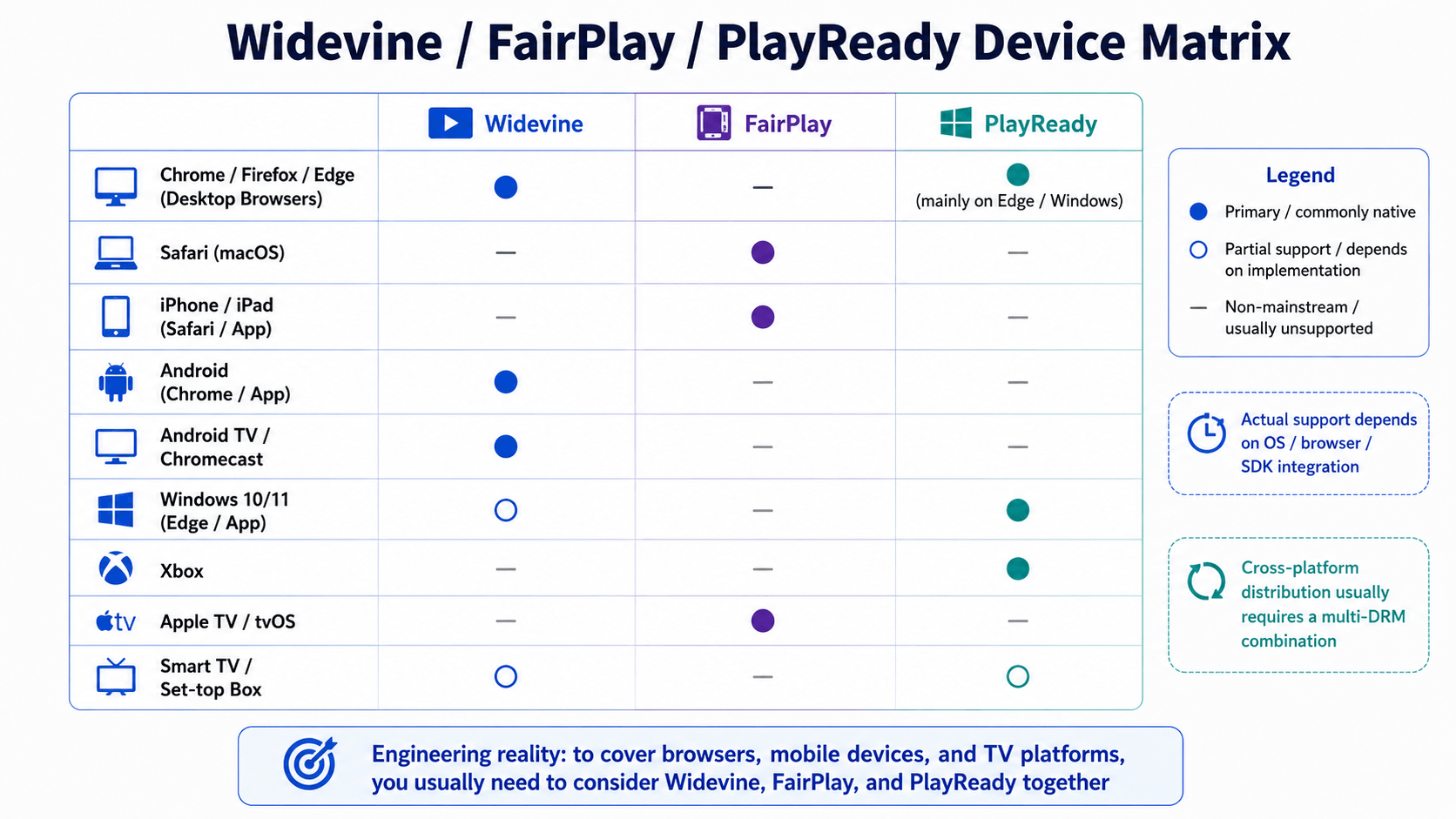
The same streaming title is typically packaged once and served to all three. Your device negotiates with the service over Encrypted Media Extensions (EME), the W3C browser API that became an official W3C Recommendation in September 2017 (W3C EME spec), and the service hands back whichever DRM your Content Decryption Module (CDM) supports. This is why a Netflix movie plays seamlessly across an iPhone, a Windows laptop, and a smart TV — three different DRM systems silently doing the same job.
What Are Widevine Security Levels (L1, L2, L3)?
Widevine has three security levels (L1, L2, L3) that control where decryption happens, and streaming services use the level to decide what quality you’re allowed to receive. L1 is required for 4K. L3 caps at 480p–720p on most services.
- Widevine L1 — All cryptographic operations and media processing happen inside a hardware-backed trusted execution environment (TEE). This is the only level that streams 4K and HDR on services like Netflix and Disney+. Modern Android phones, iPhones, smart TVs, and game consoles all use L1.
- Widevine L2 — Cryptographic operations are hardware-backed, but media processing happens in software. Rarely used in production.
- Widevine L3 — Everything happens in software. This is what desktop Chrome, Firefox, and Edge use on Windows, macOS, and Linux. Streaming services cap L3 streams at 480p–720p because software-only protection is easier to attack.
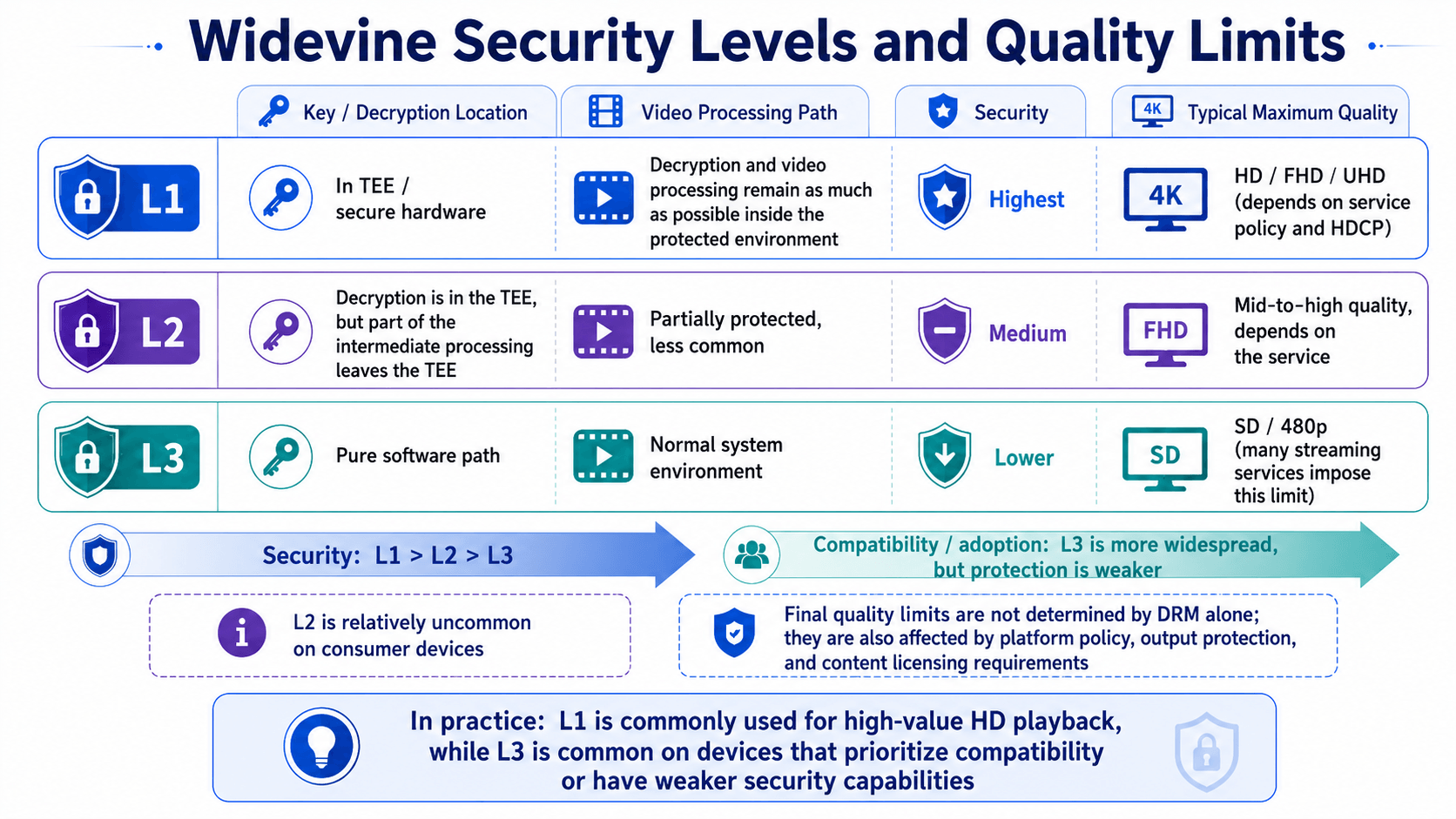
This is why the same Netflix account that streams 4K on your phone shows 720p on your laptop browser. The content is identical; the DRM trust level isn’t. There’s no setting you can change to unlock 4K in a browser without L1 hardware — Netflix and Disney+ check the CDM’s security level on every license request and refuse to issue 4K keys to L3 clients.
What Does “Protected” Mean in Practice?
DRM does more than encrypt the file. It also enforces rules about how the decrypted stream behaves on your device, which is where most user-visible friction comes from.
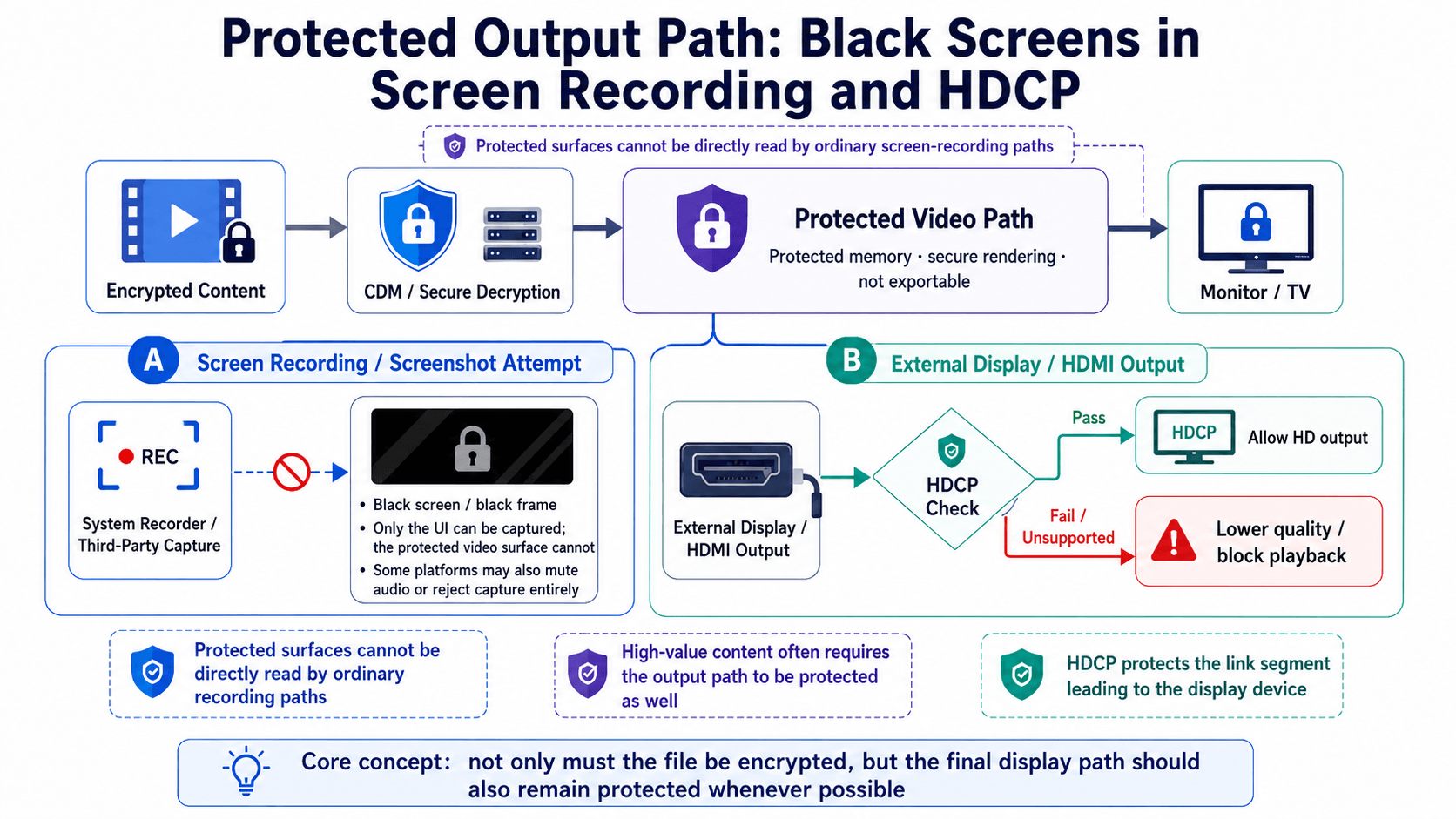
- Output protection (HDCP). When you connect a laptop to an external monitor over HDMI, DRM checks that the link supports HDCP encryption. Unsupported docks, KVM switches, or capture cards either downgrade the resolution or trigger a black screen.
- Screen recording blocked. On iOS, Android, Windows, and macOS, the OS renders DRM-protected video frames in a way that screen recorders capture as a black rectangle. The pixels exist on screen but never enter the recording pipeline.
- Resolution caps on untrusted devices. Linux desktops, older Android phones, and any browser configuration that only supports Widevine L3 are capped to standard definition by most major services.
- Device-bound licenses. Some licenses are tied to a specific device’s hardware ID. Reformat the device or move the file to another machine and the license becomes invalid, even if your account is still active.
- License expiry on “downloads.” Even offline content has a license clock — typically 48 hours after you start watching for rentals, 30 days for downloaded subscription content.
The encryption is the lock. These rules are the alarm system that fires if the lock is bypassed.
Why Do Streaming Services Use DRM?
DRM exists primarily to enforce business contracts between content owners and distributors, not to stop piracy. By 2026, every major DRM system has been broken by determined actors within weeks of release. What DRM actually does is make legitimate distribution possible at all.
- Studio licensing requirements. When Netflix licenses a Warner Bros. film, the contract obligates Netflix to use a specific DRM system at a specific security level. Without DRM, the studio refuses to license the content. This is the real driver: streaming platforms run DRM because their suppliers require it.
- Release windows. A movie may be in theaters, on premium video-on-demand, and on subscription streaming in overlapping windows at different prices. DRM enforces who can play what at which price tier.
- Geographic restrictions. Licensing deals are typically country-by-country. The license server checks your geo before issuing a key, which is why a show available in the US may simply not play in another region — even on the same account.
- Subscription enforcement. Cancel your subscription and the license server stops issuing keys. Encrypted files on your device, even those you “downloaded for offline viewing,” become unplayable within hours or days.
Once you read DRM as a contract enforcement system rather than an anti-piracy system, all of its quirks become predictable.
DRM vs Copy Protection vs Watermarking — What’s the Difference?
DRM, copy protection, and watermarking solve different problems and are often confused.
- DRM prevents unauthorized playback through encryption and license control. No key, no playback.
- Copy protection prevents unauthorized duplication — physical media schemes like Blu-ray AACS, or floppy-disk-era key disks. DRM has largely subsumed this category for digital content.
- Watermarking doesn’t prevent anything. It embeds a hidden identifier in the content so that if a copy leaks, the source can be traced. Forensic watermarking is standard on pre-release screeners and 4K UHD Blu-rays.
A modern streaming service often uses all three: DRM to gate playback, watermarking to deter insiders, and copy protection on any physical distribution.
What Are the Trade-Offs of DRM for Users?
DRM is invisible on supported devices and obstructive everywhere else. The friction shows up in five recurring places.
- Cross-device friction. A Kindle book you bought on Amazon doesn’t open in Apple Books. A movie purchased on iTunes doesn’t play on a Google TV. Each store uses its own DRM; the file format is incidental.
- Offline limits. Downloads expire. Per-device download counts are capped. Some titles can’t be downloaded at all.
- Quality penalties on less-trusted platforms. Linux users are routinely stuck at 720p on Netflix. Firefox users sometimes can’t play 1080p on services that demand Widevine L1.
- Service shutdowns end access. When Microsoft closed Zune Video and when UltraViolet shut down, customers’ purchased content stopped playing. The license servers were turned off. The files alone, without keys, were dead bytes.
- Accessibility costs. Screen readers, custom playback speeds, and assistive tools can break against DRM’s output protection, because the protected video pipeline is closed to third-party software.
You’re not buying content from a DRM-protected store. You’re buying a license to access content, contingent on the store continuing to operate its license server.
How VidMost Handles DRM-Protected Streams
VidMost is a desktop video downloader with a built-in browser engine that supports Widevine L3 encrypted streams alongside MPEG-DASH, HLS, RTMP, and MP4/MKV/WebM. Where lighter command-line tools fail on encrypted content, VidMost’s dual-engine architecture — a smart resource sniffer plus an embedded Chromium-based browser engine — handles the kinds of streams generic downloaders can’t touch.
Personal-use, offline access to content you have a legitimate right to view is what VidMost is built for: lectures you paid for, livestreams you want to archive, videos your own browser can already play. VidMost gives you a local copy on your own device, on your own terms. For a tour of features and setup, see our Getting Started with VidMost guide.
Download VidMost for Windows or macOS →
DRM is invisible when it works and infuriating when it doesn’t. Understanding the encrypt → license → decrypt flow, the three big systems (Widevine, FairPlay, PlayReady), and the studio contracts driving the whole arrangement is enough to make sense of almost every “why won’t this play?” moment you’ll hit on the modern web.
Related reading
- How Online Video Actually Plays — the full pipeline from camera to your screen, with encryption as one layer of many.
- What Is HLS and M3U8? — the playlist-plus-segments protocol that carries most streams, encrypted or not.
- MPEG-DASH vs HLS — DASH and Common Encryption (CENC), the path Widevine and PlayReady usually take.
- Why Video Quality Changes Mid-Playback — how the same ABR logic runs over DRM-protected variants, and why L3 streams cap at lower rungs.
- Video Containers vs Codecs — what’s actually inside an encrypted segment.
Read more from the VidMost blog.